Evaluating the Butterfly Multilayer Paper Cut Template for Crafting Projects
The Butterfly Multilayer Paper Cut Template represents a specialized digital asset designed for modern crafters utilizing computer-controlled cutting machines. As digital fabrication tools like Cricut and Silhouette become increasingly accessible, the demand for intricate, ready-to-use designs has grown. This template offers a structured approach to creating complex layered art, bridging the gap between amateur enthusiasm and professional-grade results. Understanding the specific attributes, compatibility, and practical applications of this design is essential for determining whether it aligns with your current crafting goals.
Understanding the Design and Compatibility
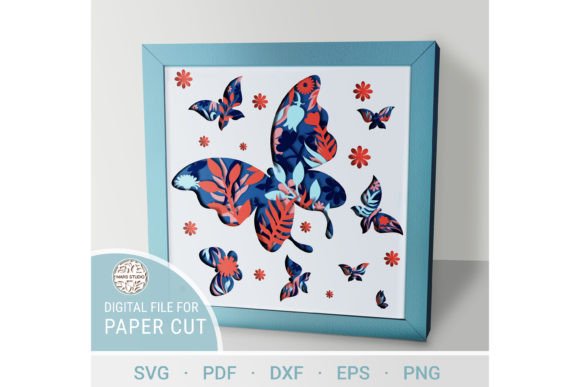
At its core, the Butterfly Digital multilayer svg files are specially prepared for precision cutting. The design is not a single static image but a composite of seven distinct layers. This multilayered structure allows creators to build depth and dimension, transforming a flat sheet of material into a three-dimensional visual experience. The template is engineered to work seamlessly with popular cutting platforms, ensuring that the intricate details and fine lines are preserved during the cutting process.
Compatibility is a primary consideration for any digital craft asset. This template is delivered in a comprehensive suite of file formats, including .AI, .SVG, .DXF, .DWG, .CDR, .EPS, and .PDF. This variety ensures that users are not locked into a specific software ecosystem. Whether you prefer Design Space, Silhouette Studio, Adobe Illustrator, or CorelDRAW, the necessary files are provided. It is important to note that the product is delivered as a .zip file, which must be unzipped before use. This step is crucial for accessing the individual format files required for your specific workflow.
Material Versatility and Technical Specifications
One of the most significant advantages of the Butterfly Paper Cutting Template is its material versatility. While often associated with paper crafts, the design specifications accommodate a wider range of substrates. The recommended materials include plywood, MDF, acrylic, plexiglas, cardboard, and various weights of paper. This flexibility allows crafters to adapt the project to different contexts, from delicate greeting cards to durable home decor items.
For those interested in working with wood or rigid plastics, the template specifies a recommended material thickness of 3 to 6 mm (approximately 1/12 inch to 1/4 inch). This range is ideal for creating sturdy wall art or standalone decorative pieces. However, working with thicker materials requires precise machine calibration. The seven-layer structure means that alignment is critical; even minor deviations can disrupt the visual coherence of the final piece. Therefore, users should expect a learning curve if they are transitioning from single-layer cuts to multilayer assemblies.
The finished product size is standardized at 8 x 8 inches. This dimension is versatile enough for framing, scrapbooking, or use as a central element in larger compositions. While the design can be scaled up to create larger statement pieces, caution is advised when reducing the size. The template contains thin elements and fine lines that may become fragile or difficult to weed if the design is scaled down significantly. Maintaining the integrity of these delicate features is paramount to achieving the intended aesthetic.
Creative Applications and User Experience
The possibilities for utilizing this template are extensive, limited primarily by the creator’s imagination. Common applications include stunning wall art, window decorations, greeting cards, and embellishments for scrapbooking and journaling. Each application leverages the depth provided by the seven layers differently. For example, in window decorations, backlighting can highlight the silhouette and intricate cutouts, creating a shadow-play effect. In contrast, scrapbooking applications might utilize fewer layers or lighter materials to maintain the functionality of the journal while adding textual interest.
Beyond the final product, the process of crafting with this template offers intrinsic benefits. Many users report that the activity provides a therapeutic and meditative experience. The requirement for focus and precision allows individuals to immerse themselves in the intricate details of the butterfly design. As you carefully cut, weed, and assemble the layers, the gradual emergence of the butterfly can be a rewarding psychological experience. This aspect of mindfulness is increasingly valued in hobbyist communities, where crafting serves as a counterbalance to high-paced digital lifestyles.
Evaluating Fit: When to Choose This Template
Determining whether the Butterfly Multilayer Paper Cut Template is the right choice depends on several factors. It is a strong fit for individuals who already possess a cutting machine and are looking to expand their portfolio with complex, layered designs. If you enjoy the technical challenge of alignment and assembly, this seven-layer design provides sufficient complexity to be engaging without being overwhelmingly difficult for intermediate crafters.
It is also an excellent choice for those seeking customizable decor. The ability to change materials and colors allows for endless variation. A crafter can produce a rustic version using kraft cardboard, a modern minimalist piece using white acrylic, or a vibrant artistic expression using colored cardstock. This adaptability makes the template a cost-effective resource, as a single purchase can yield numerous unique outcomes.
Considerations and Potential Tradeoffs
While the template offers significant value, there are tradeoffs to consider. The primary challenge lies in the assembly process. Multilayer projects require patience and precision. Users must ensure that each layer is perfectly aligned with the previous one. This may necessitate the use of registration marks or careful manual alignment techniques. For beginners unfamiliar with layered cutting, this can result in wasted material and frustration.
Additionally, the time investment is higher compared to single-layer projects. Cutting seven separate layers takes longer, and the weeding process—removing excess material from the cut design—is more tedious due to the fine lines and intricate details. Users should anticipate a longer production time per unit. Furthermore, if scaling the design down, the risk of tearing delicate paper elements increases. Therefore, this template may not be suitable for rapid production environments or for those seeking quick, simple crafts.
Alternatives may be worth considering if you lack a cutting machine or prefer hand-cutting. In such cases, pre-cut paper kits or simpler stencil designs might be more appropriate. Similarly, if you are looking for purely digital assets for graphic design rather than physical crafting, a standard vector illustration without layer separation would be more suitable.
Final Decision-Making Insights
To decide if this template aligns with your needs, assess your current skill level and equipment. If you have a Cricut, Silhouette, or similar machine and are comfortable with multi-step projects, the Butterfly Multilayer Paper Cut Template offers a high-quality foundation for creative expression. Consider your intended use case: if you aim to create durable home decor, ensure you have access to appropriate materials like MDF or acrylic. If your goal is delicate paper crafts, verify that your machine can handle fine details without tearing.
Ultimately, this template serves as a tool for transformation. It provides the structural blueprint, but the aesthetic outcome depends on your material choices and assembly skills. By understanding the technical requirements and embracing the meditative nature of the process, you can leverage this design to create elegant, personalized artifacts that enhance any space or occasion.